Give your clients a GoHighLevel experience that looks like your brand. Theme Studio is one editor for your colors, fonts, menus, icons and logo on every sub-account they log into.
Your agency has its own identity. Let your platform show it.
You have put work into your brand. Carry that same visual identity into the platform your clients use, so the experience feels considered from the first login.
Starting appearanceDefault interface colorsWith Theme StudioA palette that reflects your brand
Starting appearanceA general visual styleWith Theme StudioTypography and details chosen for your agency
Starting appearanceBranding that ends at the logoWith Theme StudioA consistent appearance across the supported screens
What agency owners say when they see it
See what stands out when the platform starts reflecting the agency behind it. These are unedited messages sent after the founder shared a demo of his themed account and onboarding widget in HighLevel communities: reactions to the demo, not Theme Studio reviews yet. The video is a Business Toolbox customer on camera. Every buyer is asked for a quote 14 days after purchase.
“We've doubled our revenue, and we've significantly increased our profitability. Business Toolbox has been an absolute game changer.”
Amanda Miller, owner of 360 Home Services
Customer video · about Business Toolbox, the company behind Theme Studio
The original messagesNine unedited community replies, as screenshots
See your brand take shape inside GoHighLevel.
Follow the changes from the Theme Studio editor to the client-facing interface. Recorded in a real agency account, 1 minute 13 seconds, captions included.
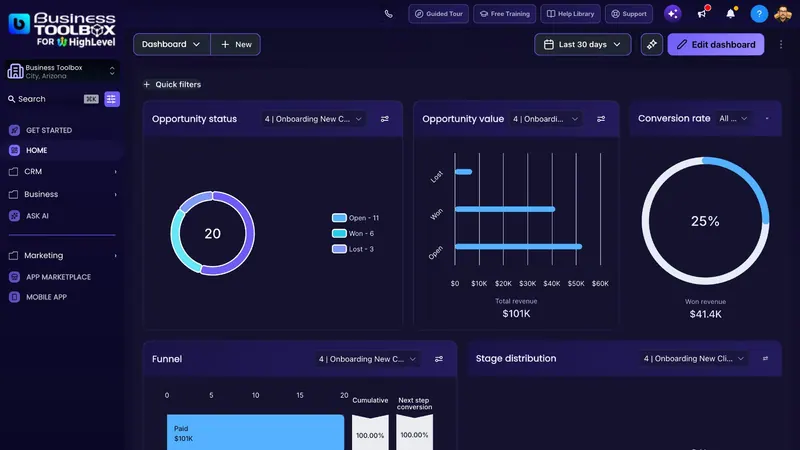
BeforeThe stock dashboard your clients see today.
Pick a themeA ready-made theme repaints the workspace live.
Or describe your brandBrand AI builds a starting point from a short brief.
RefineColors, the menu and its icons, and the sign-in page, no CSS.
SaveThe theme is live for every user on your domain.
One editor for your GoHighLevel brand experience
Theme Studio changes how GoHighLevel looks on your white-label domain: colors, fonts, menus, icons, the header, buttons, cards and logos, plus a sign-in page design. The builders, the app marketplace and HighLevel's mobile apps stay native so they keep working.
Bring your brand into the interface.
Choose the colors and typography that reflect your business, then see them applied to the supported parts of your GoHighLevel workspace: the sidebar, header, buttons, cards and page background, with text contrast kept readable.
CustomizeStyle, colors, fonts and text, and the other rows, over the dashboard they change.
Refine the details clients notice.
Shape the menu and its icons, rename or hide items, set the header buttons and the logos, and design the sign-in page in the same editor, delivered as paste-ready Custom CSS for GoHighLevel's login page.
Menus and iconsRenamed items and swapped icons in a themed sidebar.Branded loginThe sign-in page design, pasted as Custom CSS.
Start with a direction you can make your own.
Pick one of 20 ready-made themes, light or dark, or describe your brand to Brand AI and generate a starting point in seconds. Preview it live, then refine it around your agency's identity.
Ready-made themesTwenty curated themes with Light, Dark and Saved filters.Brand AIA brand description, palette and personality chips above Generate.
Match the brand to the account.
Save one agency default and every sub-account on your domain inherits it. Open any sub-account to give that client its own look, or publish a client's theme agency-wide. One license covers one agency and one white-label domain with unlimited sub-accounts.
Client themesThe panel inside a sub-account with "Save to" set to This sub-account.
Founder Pass $797 once or $67/month · 14-day money-back guarantee
From your brand to your GoHighLevel workspace.
Three steps, each with a real screen. Installation is one snippet pasted once in Agency Settings; your clients install nothing.
Paste one snippet
After checkout your activation code is on the success page and in your email. Enter it with your white-label domain, such as app.myagency.com, on the activation page; it shows your snippet. Paste that under Agency Settings → Company → Custom JavaScript, save, reload.
Choose your starting look
Theme Studio opens inside GoHighLevel for agency users. Pick one of the 20 ready-made themes, light or dark, or describe your brand to Brand AI and generate a starting point.
Make it yours, then save
Adjust colors, fonts, menus, icons and logos in the editor and check the result on the supported screens. Save, and every sub-account on your domain sees the theme on its next page load.
Before you start: you need your own HighLevel agency account with a white-label domain (the Unlimited plan and up; Starter has no white-label app) and agency admin access for the Custom JavaScript setting. Theme Studio changes how GoHighLevel looks, not what it does; switch it off and the stock interface returns. Plan details · Install details
Why not custom CSS or a developer?
Both can brand a dashboard today. The difference is what happens on GoHighLevel's next release.
Native Layout Integrity
Hand-written CSS matches today's markup and cracks on the next GoHighLevel release. Theme Studio tracks 1,100 interface elements and ships fixes through the hosted runtime; when GoHighLevel changes a component we have not mapped yet, that item keeps its native style instead of breaking your layout.
How the options compare
Theme Studio, a developer, your own CSS and stock GoHighLevel, side by side
Of the options below, Theme Studio is the only one that runs inside GoHighLevel, updates from our side, and switches off in one click.
Question
Theme Studio
Hire a developer
Write your own CSS
Stock GoHighLevel
Time to a branded dashboard
About 5 minutes
Days to weeks
Hours, then ongoing upkeep
Not available
When GoHighLevel changes its interface
Fixes reach you automatically. Anything unrecognized falls back to native.
You pay for each fix
You find and fix it yourself
Nothing to fix
Every sub-account inherits the theme
Yes, automatically
Depends on the build
Set up per account
No theme
Branded login page
Designed in the editor, pasted as Custom CSS
If you pay for it
If you build it
Logo and favicon
Rename menus, swap icons, hide items
Click and change
Per request
Per rule, by hand
Limited
Starting point
Brand AI and ready-made themes
A brief and a quote
A blank stylesheet
The default look
Back to stock GoHighLevel
Switch it off
Remove the code
Remove the code
Already there
What it costs
One license for the whole agency
Per project, plus every fix
Your time, repeatedly
Included
Built for agencies that want their brand to carry through.
Theme Studio is an appearance layer for the GoHighLevel your clients log into, not a replacement CRM. Here is who gets the most from it, and what it deliberately leaves alone.
Agency ownersWhite-label
Present a client platform that reflects the identity of your business, on the domain your clients already log in to
SaaS resellersYour UI, your product
Give the supported GoHighLevel interface a more distinctive visual presentation when the platform itself is what you sell
Teams serving multiple brandsPer-client themes
Agencies, coaches and communities that run several brands: one agency default, a different look for any client account
Requires: your own HighLevel agency account with a white-label domain (Unlimited plan and up). Theme Studio is an appearance tool for GoHighLevel, not a standalone CRM.
Not for
Six things Theme Studio deliberately leaves alone
A sub-account under someone else's agency. Theme Studio installs at the agency level, so you need your own HighLevel agency account with a white-label domain. A single business on its own agency account is fine. No domain yet? Start there, then come back.
Restyling the builders or the marketplace. Funnel, website, form, email and workflow canvases and the app marketplace stay native so they keep working
The native mobile apps. Theme Studio themes the web app in desktop, phone and tablet browsers; HighLevel brands its own mobile apps separately
Changing what GoHighLevel does. Theme Studio changes how it looks, not routing, data or permissions
A pixel-perfect custom app. This is theming in about 5 minutes, not a rebuild
Anyone who needs a free trial. There is none; the 14-day money-back guarantee on your first payment is the trial
Built by someone who uses GoHighLevel.
Cody CastleFounder, Business Toolbox
I built Theme Studio because I wanted more control over how my own GoHighLevel platform looked. My goal was straightforward: make the client experience feel connected to the agency's brand, with the visual controls in one place.
Before it existed I themed my own account, built an onboarding widget for it and shared a demo in a HighLevel community. The messages above are what came back. Every theme I had built until then shared one weakness: hand-written CSS that broke on the next GoHighLevel update. Theme Studio runs on GoHighLevel's native layout and shows the stock interface for anything it does not recognize.
Support is by email. Questions before or after you buy go to me at support@businesstoolbox.io, and I reply within one business day, Monday to Friday.
Cody Castle · Founder, Business Toolbox
Included with every plan
Three tools that ship with Theme Studio at no extra cost, on the Founder Pass and on Monthly.
Give every new sub-account a guided checklist so clients know exactly what to do next, and your team fields fewer "where do I start?" messages.
Included now
Set a logo per sub-account so each client sees their own mark across their dashboard, on top of your agency theme.
Included now
Make pipeline activity easier to read with visual timers inside the client experience, so stalled opportunities stand out.
Included now
Give your GoHighLevel platform a look that belongs to your agency.
Get Theme Studio and the three included tools. Both plans cover one agency and one white-label domain with unlimited sub-accounts, users and client themes. Prices are in US dollars; the price and terms here are the ones you see at checkout.
Only 100 available
Founder Pass
For agencies that want the branded platform once, with every future update included.
Regular price $997
Loading price…
You save $200 today
One agency · one white-label domain · unlimited sub-accounts, users and client themes
Full Theme Studio access for your agency
Brand AI and 20 ready-made themes
Menus, icons, Pick & Style and per-client themes
Onboarding Widget, Sub-Account Logos and Pipeline Timers
The first 50 Founder Passes are $797. The remaining 50 rise to $997.
14-day money-back guarantee on this payment. Payments by Stripe; card details never touch our servers.
Right after payment: your activation code on screen and by email, then the activation page shows your install snippet. Updates ship for the life of the product; support is by email.
See everything included
Why this price: a one-off developer build costs more, takes longer, and still needs maintenance when GoHighLevel changes. Theme Studio gives you the branded experience, update handling and agency-wide deployment in one license.
Everything in the Founder Pass:
Full Theme Studio access for one agency
Unlimited sub-accounts and users
Unlimited client themes, with an agency default every sub-account inherits
Brand AI and 20 ready-made themes
Menus, icons, Pick & Style and the login page design
All future Theme Studio updates, for as long as we offer the service
Email support from the founder
Onboarding Widget
Sub-Account Logos
Pipeline Timers
Pay once instead of renewing every month. At $67/month, the Founder Pass becomes the lower-cost option after 12 months, while keeping every future update included.
See the 100-pass price ladder
Passes 1 to 50
$797
Available
Passes 51 to 100
$997
Open next
After pass 100
Monthly only
Not yet
Once all 100 are sold, the Founder Pass disappears permanently.
"Lifetime" means a license that does not expire, with every future update, for as long as we offer Theme Studio. If we ever discontinued it, license holders would get at least 90 days' notice.
Guaranteed safe checkout
Payments by
256-bit encrypted · Card details never touch our servers · Activation code on screen and by email
Monthly
For agencies that want to start small and keep the option to cancel.
Loading price…
One agency · one white-label domain · unlimited sub-accounts, users and client themes
Full Theme Studio access for your agency
Brand AI and 20 ready-made themes
Menus, icons, Pick & Style and per-client themes
Onboarding Widget, Sub-Account Logos and Pipeline Timers
First payment refundable in full within 14 days. Cancel any time; access runs to the end of the paid period, then GoHighLevel returns to its native look.
Right after payment: your activation code on screen and by email, then the activation page shows your install snippet. Updates and email support while subscribed.
See everything included
Everything in Monthly:
Full Theme Studio access for one agency
Unlimited sub-accounts and users
Unlimited client themes, with an agency default every sub-account inherits
Brand AI and 20 ready-made themes
Menus, icons, Pick & Style and the login page design
Updates while subscribed
Email support
Onboarding Widget
Sub-Account Logos
Pipeline Timers
Billed in advance each month until you cancel. Later monthly payments are not refundable. If you cancel, your saved theme is kept and restored if you subscribe again.
Guaranteed safe checkout
Payments by
Choosing between them: the Founder Pass is one payment that stays yours for the life of the product, with every update; Monthly bills each month until you cancel and switches the theme off when it ends. Both are covered by the same 14-day guarantee on the first payment.
“That onboarding process of yours is nice!!! Great work!”
Agency owner · unedited reaction to the demo video (the Onboarding Widget is included with every plan)Before you buy: eight quick answersPlan, install, clients, scope, updates, billing, phones and refunds
Which GoHighLevel plan do I need? One with a white-label domain (Unlimited and up), on your own agency account. No domain yet? Set that up first, then come back. Details
What does installation involve? Paste one snippet under Agency Settings, then Company, then Custom JavaScript, save and reload. About 5 minutes, no developer. See the steps
Do my clients install anything? No. Every sub-account on your domain sees the theme on its next page load; only agency users see the editor. Details
What changes, and what stays with GoHighLevel? Colors, fonts, menus, icons, header, buttons and logos change. Routing, data, permissions, the builders and the native mobile apps stay GoHighLevel's. Details
What happens when GoHighLevel updates? Fixes ship through the hosted runtime with nothing to re-paste; anything not yet mapped shows its native look. Support is by email, within one business day. Details
One-time payment or subscription? Both: the Founder Pass is one payment for a license that does not expire, with every future update for as long as we offer Theme Studio; Monthly bills each month until you cancel. Details
Can I get a refund? Yes: email us within 14 days of your first payment, on the Founder Pass or the first Monthly payment, for a full refund. Details
Does the theme show on phones and tablets? Yes, in any browser on your white-label domain, with GoHighLevel's own mobile layout kept. HighLevel's native mobile apps stay HighLevel-branded. What it leaves alone
Payments are processed by Stripe. We never see your card details.
Backed by a 14-day money-back guarantee
Try Theme Studio for 14 days. Theme a client account, and if it is not right for your agency, email support@businesstoolbox.io within 14 days of that first payment for a full refund. Switch the theme off and stock GoHighLevel comes back exactly as it was.
Either your clients log in to a platform that looks like yours, or you get your money back.
Cody Castle, founder
Know what you are getting before you buy.
Ten answers, each from the current product and terms. Nothing here is gated behind a form.
What does Theme Studio change?
How GoHighLevel looks on your white-label domain: colors, fonts, the sidebar menu and its icons, the header and its buttons, page and card styling, logos and the browser icon, plus a sign-in page design delivered as paste-ready Custom CSS. It does not change what GoHighLevel does: routing, data, permissions, workflows and every native feature stay GoHighLevel's. The funnel, website, form, email and workflow builders, the app marketplace and HighLevel's native mobile apps are left untouched by design.
Which GoHighLevel plans and permissions do I need?
Your own HighLevel agency account with a white-label domain, which is the address your clients log in on. HighLevel includes the white-label desktop app from the Unlimited plan up; the Starter plan does not have it, so there is nothing to theme yet. Installation happens in Agency Settings, so you need agency admin access, and a sub-account inside someone else's agency cannot run it. Check HighLevel's pricing page for the current plan names, set up app.youragency.com first, then come back.
How do I install or apply it?
After checkout your activation code appears on the success page and is emailed to you. On the activation page, enter the code and your white-label domain; the page then shows your install snippet. Paste it once under Agency Settings, then Company, then Custom JavaScript, save and reload. Theme Studio opens inside GoHighLevel for agency users: pick a ready-made theme or describe your brand, adjust the details, and save. Your clients install nothing.
Can I use a different theme for each sub-account?
Yes. The theme you save as the agency default is what every sub-account on your domain shows on its next page load. From inside any sub-account you can save a different theme for that client only, and you can publish a client's theme to the whole agency. Clients see the theme, not the editor: the Theme Studio panel only opens for agency users. One license covers one agency and one white-label domain with unlimited sub-accounts, users and client themes.
Will this change my workflows, contacts, or data?
No. Theme Studio is a visual layer on GoHighLevel's native layout: your workflows, contacts, pipelines, permissions and settings are untouched, and the theme only changes how the interface looks. It reads nothing from your CRM data. The builders and the marketplace keep their native look so they keep working, and switching the theme off returns the stock interface.
What happens when GoHighLevel changes its interface?
Your snippet loads the hosted runtime, so fixes are pushed from our side and appear on your domain automatically with nothing to re-paste. When the theme does not recognize part of a new interface, it shows that part in its native GoHighLevel form rather than a broken screen, so your clients keep working while the update ships. If something looks off, email support and we handle it from our side.
Can I return to the default appearance?
Yes, at any time. Switch the theme off inside Theme Studio and stock GoHighLevel is back without a reload; remove the snippet from Custom JavaScript and it is gone for good. Your saved theme is kept, so you can switch it back on later. If you cancel Monthly, the theme switches off at the end of the paid period and the saved design is restored if you subscribe again.
Is this a one-time payment or a subscription?
Both are available. The Founder Pass is a one-time payment in US dollars for a license that does not expire: the full Theme Studio product, the Onboarding Widget, Sub-Account Logos, Pipeline Timers and every future update, for as long as we offer the service, for one agency and one white-label domain with unlimited sub-accounts and users. We are selling exactly 100: the first 50 at $797 and the last 50 at $997, after which Theme Studio is monthly only. Monthly is billed in advance each month until you cancel. If we ever discontinued Theme Studio, license holders would get at least 90 days' notice.
What support and updates are included?
Email support at support@businesstoolbox.io, answered by the founder within one business day, Monday to Friday, before and after you buy. Updates ship through the hosted runtime with nothing to re-paste: on the Founder Pass for the life of the product, on Monthly while you are subscribed. There is no phone support and no setup-for-you service; the activation page and the FAQ carry the install steps.
What is the refund policy?
If Theme Studio is not right for your agency, email support@businesstoolbox.io within 14 days of your first payment and we refund it in full, on the Founder Pass or on the first Monthly payment. After a refund the license ends and stock GoHighLevel returns. Later Monthly payments are not refundable; cancel any time to stop future charges and keep access to the end of the paid period.
Make the next client login feel like your brand.
Bring your visual identity into GoHighLevel with Theme Studio. Only 100 Founder Passes exist: currently $797 for passes 1–50, then $997, and once they are gone Theme Studio is monthly only. Pay once and keep it, with every future update, for one agency and one white-label domain.
Full Theme Studio access, unlimited sub-accounts and client themes
Brand AI, 20 ready-made themes, menus and icons
Onboarding Widget, Sub-Account Logos and Pipeline Timers included
The first 50 Founder Passes are $797. The remaining 50 rise to $997.
We use cookies for analytics and to measure our ads, but only once you accept. Until then, essential cookies only. Privacy Statement · Do Not Sell My Info